2 Add interlocutors
From version 1 onwards, you can add your most "frequent" interlocutors to the IGOOR software. This improves the quality of the predictions, because IGOOR can recognize them automatically through their voice when they speak with the user, resume conversations with the specific person, adapt the style according to the person, etc.
IMPORTANT: Automatic recognition of interlocutors through their voice is continuous, even outside of conversations. It happens 100% on your device. No voice data is sent during enrollment or recognition.
Adding an interlocutor
Go to:
Settings > Home > Context > Add people
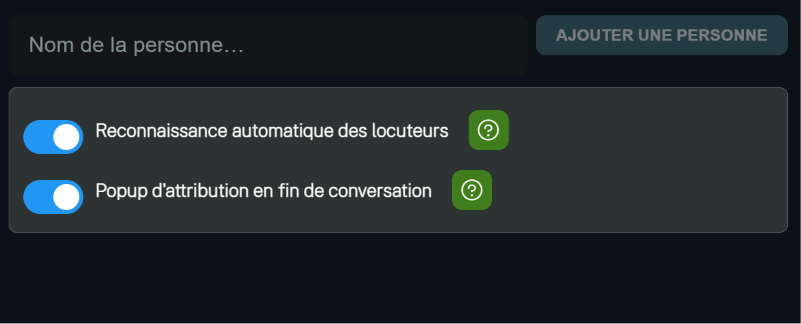
Enter the person's first name (e.g. "Julien") in the field and click Add a person. The person will appear in the list on the right.

Give a UNIQUE first name, so that IGOOR can easily connect it to the information it has about you. In case of homonyms, prefer something like "Julien M.".
Automatic recognition of interlocutors
This feature is designed to be used together with automatic recognition of the person's voice. For privacy reasons, it is disabled by default in IGOOR. You need to enable the feature using the toggle:
Recording the interlocutors' voice profile
To be able to recognize them, IGOOR needs voice samples from the interlocutors. Click on:
Add a recording
To the right of the person's name.
Follow the on-screen instructions so that your interlocutor records at least three different sentences.
TIP: Record more than three sentences, at different distances and positions from the device and the microphone, to improve IGOOR's recognition ability.
At the end, IGOOR recreates the user's voice profile in its internal database.
Automatic recognition
When nobody is speaking, or if IGOOR cannot recognize any voice, you will see "Unknown" selected at the top right.

As soon as IGOOR recognizes a voice, it will assign it to an interlocutor (e.g. "Carlo"). After a few seconds of silence, IGOOR will return to "Unknown".
During a conversation, if IGOOR recognizes an interlocutor with a certain level of confidence, it will automatically assign the conversation to that interlocutor, who will then remain selected for the duration of the conversation. For now, you can assign the conversation to only one interlocutor.
Manual assignment
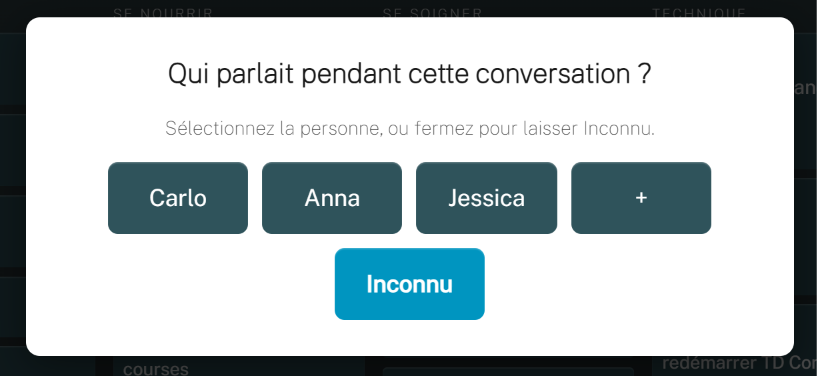
At any time, you can manually assign an interlocutor to the conversation by clicking on their name. IGOOR shows you the three most frequent interlocutors in your conversations, with a "+" button to display the next three. This feature exists even if you do not wish to record voice profiles.
If you wish, you can enable a popup that asks you to assign an interlocutor at the end of the conversation, if no interlocutor was recognized (manually or automatically).
We recommend using this popup at the end instead, so that the user does not also have to take care of this during the conversation. The popup disappears automatically after 15 seconds.