2 Recording the biographical memory
To help IGOOR know more about the user and their circle from the very beginning, we designed a form together with the ARSLA association, based on early feedback from users of previous versions of IGOOR.
Since version 1, IGOOR includes a tool that allows the user to fill in plenty of information about themselves, their health condition, their family, their preferences, etc. This form can be filled in using the user's voice, or using the keyboard (or the virtual keyboard). If the user's voice is used, it can later be used for voice cloning.
IMPORTANT: Although optional, we strongly encourage you to record your biographical memory as early as possible. This will improve the quality of IGOOR's predictions and, along the way, preserve your voice for possible cloning in the future.
Accessing the biographical memory recording tool
You can access it from:
Settings > Home > Record biography
The form offers more than 60 questions. The questions are organized by themes (e.g., FAMILY in the screenshot) and questions ("Do you have children? Can you give us their names and ages?").
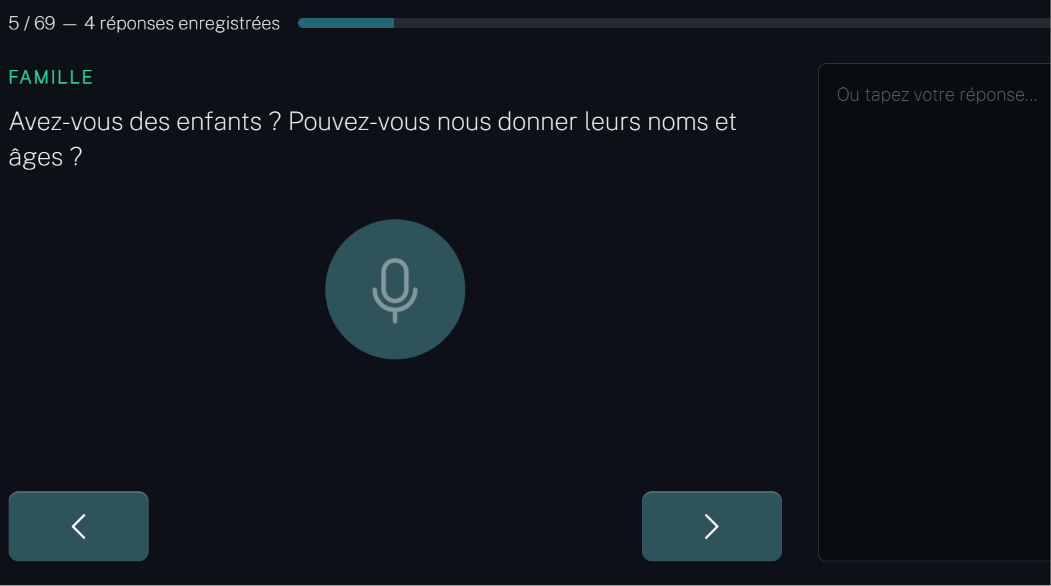
By clicking on the microphone icon, IGOOR starts recording: your sentence will be transcribed by the voice recognition model you chose in 2 - Cloud voice recognition. After a short delay, the transcription will appear on the right, and you will be able to correct or improve it if needed.
If you cannot, or do not want to use your voice, you can write directly in the text field on the right. You can answer only the questions that interest you, and skip the others. You can come back at any time. When you have finished a question, click on the right arrow to move on to the next question.
NOTE: The questions are basic prompts; the user can expand on the theme, digress onto other topics from their life, etc. The AI will synthesize all the information provided.
At the end of the questions, you can generate the biography and also (optionally) generate the voice sample to be used later for voice cloning purposes (see 4 - Voice cloning):
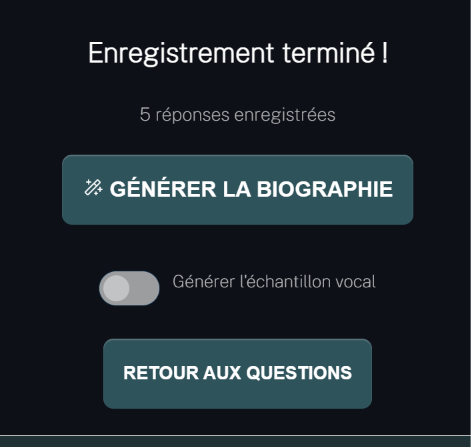
When you click on Generate biography, IGOOR synthesizes your answers into a document that is systematically sent to the AI to improve the quality of the predictions. You can at any time manually correct this document by going back to:
Settings > Home > Record biography
You can also regenerate it, and regenerate the voice if you have added other voice samples.
A missing question?
We regularly update the questions in this tool. If you notice the absence of a question that seems very important to ask, please report it to the email address support@igoor.org.